domingo, 1 de septiembre de 2013

How Amazon Is Tackling Personalization And Curation For Sellers On Its Marketplace

When it comes to personalization, Amazon has been one of the pioneers in mining and using data to create a more curated e-commerce experience for consumers. But by now, nearly all e-commerce companies and marketplaces have caught on and are using more personalized recommendations to enhance the user experience when shopping and browsing.

Amazon has been particularly focused over the past few years on extending its personalization features for its sellers on the marketplace, both on the front-end consumer experience and on the backend.

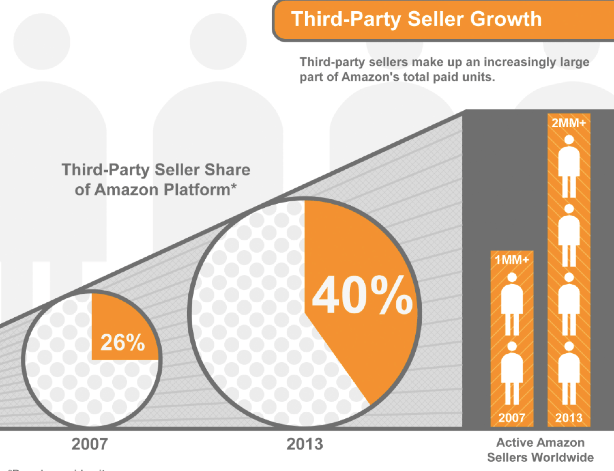
We sat down with Peter Faricy, vice president and general manager of the Amazon Marketplace, to talk about how he and his team are approaching personalization for the company's 2 million third-party sellers worldwide across 10 global marketplaces. Read our Q&A, which begins with Faricy providing some background information about Amazon Marketplace.

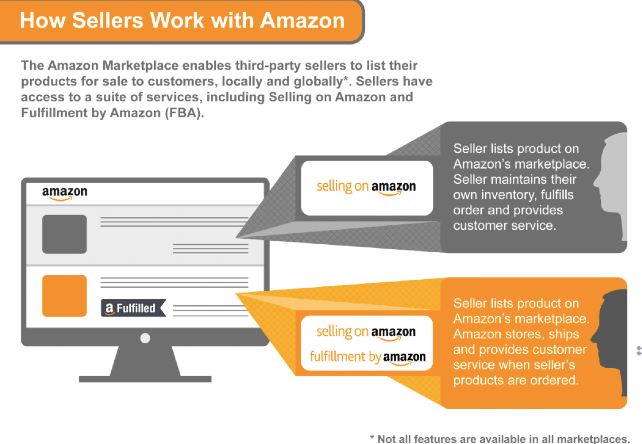
Peter Faricy: We have over 2 million sellers around the world selling across Amazon Marketplaces in 10 different countries around the world, and serving more than 200 million customers all over the world. So it's that business that me and my team are responsible for. What we specifically do is we provide all of the technology and the products and services that sellers need around the world to run their business on Amazon.

So we are sort of your e-commerce engine, if you will. And the technology we develop helps them run their business on the Amazon Marketplace and reach customers and grow their business very successfully. So that's kind of the quick background, if you will.

Leena Rao: So, one of the things that Amazon has been known for is being the pioneer of personalization and data mining to make the consumer shopping experience a much more curated type of shopping experience. So I am curious, sort of your view on this, and then how has that personalization strategy changed over time?

PF: Well, in the case of the Marketplace, we think about customers in two ways; we obviously think about the Amazon-buying customers and what they need and everything kind of starts with those customers in mind. But we also think of sellers on the Amazon Marketplace as our customers.

And sellers years ago began asking us questions around, what are the things that they can do to improve their business? How can they manage inventory better? What products should they be adding? How do they serve customers better?

So what I think you are referring to in this personalization, we developed some super-innovative technology three or four years ago that makes proactive, data-driven recommendations to each and every seller on the platform. And they range from suggestions on inventory quantities to new selections they should consider adding, to products they should consider fulfilling using a different surface than they use today.

We developed some super-innovative technology three or four years ago that makes proactive, data-driven recommendations to each and every seller on the platform.

And we have had great success with our sellers. We get a lot of positive feedback from developing these recommendations. And most of all, the way we kind of judge how helpful these are to sellers is how much they are used, and we know that sellers are actively using these recommendations to run and grow their business.

The part that's been interesting for me is that it's all self-service. So there is– when you mention how has it changed over time, we make every single day tens of millions of recommendations across all those different sellers. And on average a typical seller might have 100-plus recommendations in their queue in these different categories we have talked about before.

So we send them emails with recommendations. They can also take a look on our portal called Seller Central. On the Gateway page there is a platform called Selling Coach or Seller Coach and all the recommendations are also stored there.

And then we have many sellers that also plug into our business reports in different ways, and the recommendations are also available on our business reports. So we have got to serve up the recommendations in the manner that's most effective for each seller, but try to give them the benefit of the data we have, our evaluation of their performance, and try to help make recommendations on what they can do to grow their business.

LR: When did you start doing this?

PF: Yeah, I think we started our first test in 2009, and probably went full-scale in 2010, and now it's available in every country that we run a Marketplace in across the world, and every one of our sellers can access these recommendations.

LR: So what about the data and the signals you are using to help sellers personalize the Amazon experience for the end user, for me, who is, say, buying diapers on Amazon. How are you helping sellers then kind of draw the customer in through personalization?

PF: Yeah, I will try to give you a couple specific examples. I mean, as a customer one of the things that you rely upon is making sure that every product you are searching for is in stock.

And so sellers really value, they have told us, our guidance on when they are about to run out of stock and how much inventory quantity they should carry. And depending on the season of the year, particularly during the holiday season, it's difficult to know how much inventory to have in stock, as the sales ramp up closer to the holiday season, in November, December.

So one example is that we give — one of our most popular recommendations is called straightforward enough, almost out of stock. So we take a look at how much you are selling; we take a look at the inventory that you have in stock on Amazon, and we make a recommendation based on what we think the forward-looking demand for your product will be, how much more you should add to inventory.

So that's a super simple one, but honestly one of the most powerful ones for serving customers better, managing your inventory in e-commerce is very, very challenging, and sellers tell us they really find our recommendations useful.
fba-Marketplace-US.jpg-2

LR: What are some of the other way's that you are using data to kind of serve up additional recommendations which then brings traffic to sellers?

PF: When customers go to search for something on Amazon, and either they can't find the product at all, which we call no search results, or the search results are of low relevancy, we have a way to measure how relevant the results are we return. We take that information and immediately surface it back up to sellers who already sell similar products and recommend that they also begin to carry these products that customers are looking for.

LR: It sounds like Amazon wants to go beyond just providing the kind of access around the stock or in the fulfillment, but also help them on the backend with their sales and business and things like that.

PF: Yeah, exactly, I think that's a good way to say it. I mean, right now the most popular areas we are helping sellers on are things like inventory, which we talked about; helping them find new selection, new products to add to Amazon. We've got a lot of positive feedback on those recommendations.

Also, the fulfillment recommendations are super-critical, because we do offer a service called Fulfillment by Amazon, which is very popular with sellers, and some sellers choose to keep some inventory that they manage the fulfillment on their own. But for some of the more challenging inventory to fulfill for example, they may use Fulfillment by Amazon. And so we make recommendations based on the characteristics of how difficult these products are to fulfill or the seller's own performance of doing a great job on serving customers and getting the products there fast and easily.

And so for sellers who have a more challenging time doing that we make recommendations in fulfillment. And then you know the area that's been really growing quite a bit in popularity, is we are beginning to help sellers identify areas where they can improve the sharpness of their pricing.

So, for example, on the pricing world we surface up the sellers of all the different products you carry on Amazon, which of the products that you knot the lowest price on, and that allows them to go back and take a look at those products easily and determine whether or not it makes sense for their case to lower the price for customers.
fba-Rise3P-US.jpg

LR: When it comes to social data, I am curious how sellers are responding to that sort of data when it comes to commerce. And do you feel like additional data from the customer is something that sellers are becoming more excited about?

PF: Yeah, I think, clearly "social" being a kind of a broad term certainly in an area that sellers understand how important that is to customers. And one of the ways that we try to connect customers and sellers on the Amazon detail page, is a new feature we introduced earlier this year called Ask, A-S-K, and you could see now, but if you go down some of our detail pages, we do something really interesting which is that we allow customers to ask a question about a product.

One of the things that our sellers love about selling on Amazon is they are really in complete control of their business.

Let's say they are buying a camera and they want to know how good this camera is for shooting their children's sporting events. And it's kind of one of those questions, it isn't exactly covered by the data that is provided about the camera, but it's kind of a more "ask a friend" kind of a question. And we serve those questions up in an anonymous way to both the sellers of the items and also customers who previously purchased that item.

And so far we've had a great response rate. We've had answers come back very, very quickly and very, very thoughtful for people who already own the product or are selling the product.

So in the case of sellers who participate in this I think they have been pleased that they can, in this case, use kind of a more social angle to help customers find the product that's best for them.

LR: Do you think that social data is something to allocate from Facebook, and are there different types of social data that work and some that don't?

PF: Well, we don't publicly discuss what kind of data we use for the recommendation, but certainly social data that's publicly available like you are describing is certainly one of the inputs we use.

LR: From the sellers' standpoint, Peter, how do you balance serendipity versus discovery? I think that a lot of sellers want, I am imagining, their product to be discoverable. How do you balance that need for discovery with also having millions of sellers on the platform?

PF: Well, one of the things that our sellers love about selling on Amazon is they are really in complete control of their business. So when it comes to these data-driven recommendations we allow them to opt in and opt out. We make over 50 different recommendations today and they can choose which recommendations we service up to them based on the ones that are most important to them or most important for their product.

We challenge ourselves and we measure how useful they are. We know the majority of our sellers actually use our recommendation today, because we measure and track that. Then we also track how much improvement to their business did they get from using our recommendation and we hold ourselves accountable.

LR: What would you say the most popular tool that sellers using when it comes to personalizion? using some of these personal additional tools you offer?

PF: The No. 1 is an email called the Almost Out-of-Stock email. So those words "Almost Out-of-Stock" are almost like their own brand in the seller world. So that still remains by far the most popular type of recommendation we make today, because you could imagine for sellers who either sell a lot of products in total or who are trying to manage their inventory through different types of seasonality or who are also trying to manage their inventory across multiple marketplaces. Many of our largest sellers sell on other marketplaces in addition to Amazon.

So they have a really big challenge to keep up with the demands of managing their inventory well. So, the "almost out of stock" set of recommendations, this has been the most popular.

But I will say what's been increasing dramatically, is the appetite from sellers, and our ability to help them in adding new products to Amazon. And so we have millions of unique products at Amazon today and yet, I can tell you we have an opportunity to add millions more.

Our goal is to make it very easy for them to come join Amazon and very easy for [sellers] to make money, and we know that it's really a win-win.

And so we surface up recommendation for sellers and we kind of do it in a way that's smart and effective for them. So, if there is a seller who is selling lacrosse goals, and lacrosse sticks, and we notice there is an opportunity to add lacrosse jerseys and lacrosse balls, I obviously make those recommendations to them and so sellers really find, from the feedback they've given us, really find our selection recommendations to be really, really helpful and help them grow their business.

LR: What else is on a seller's mind and what are you thinking about when it comes to future products?

PF: One of the things that sellers give us very positive feedback on is that we don't charge sellers extra in order to receive these recommendations, and so you may see other participants in e-commerce taking other strategies here. But, we've for as long as the marketplace has existed, we don't charge sellers listing fees and we don't charge sellers fees for our recommendation.

So our goal is to make it very easy for them to come join Amazon and very easy for them to make money, and we know that it's really a win-win. If we could help sellers to serve customers better, our customers will be happy, sellers will get to grow their business and of course that creates a great Amazon Marketplace.

So, the fact that this is a really innovative service free of charge I think is also kind of unique even in today's world of e-commerce.

On the forward-looking front, I think without question there is a couple of topics that are on sellers' minds; one is that many of them see the opportunity to grow their business beyond the current geography or country they are in.

So we're beginning to make more and more recommendations for sellers on products they can sell outside their home country. And I think this is a game-changer, Leena, because if you think about the history of business, the only way you could experience it geographically was to maybe go plant the flag and open up a new office and add lots of capital and lots of overhead trying to figure out how to serve a new country. Being able to reach 10 countries on the Amazon Marketplace alone, plus customers from all over the world who shop those 10 marketplaces, is becoming a bigger and bigger opportunity for sellers. So that's one.

And then I think the other is back to this topic of selection. I think there are a lot of interesting categories at Amazon that customers are really happy with and want to find more and more selection. And one example would be softlines; so clothing, apparel, accessories, shoes. That's an area where we're beginning to have really great customer experience, and we're able to provide sellers with better and better recommendations of new products and new brands we love to see them add to the marketplace.


sábado, 31 de agosto de 2013

Can You Trust the Cloud?

Marcus asks,

"Is it safe to trust the cloud? I've heard over and over again about how the benefits of "the cloud." I'm worried though that if I store all my data on someone else's servers, it won't be secure. Or even worse, the government will have access to it. Can I trust the cloud?"

Great question, Marcus! Cloud computing isn't a new concept — it's been around since the 1950s — but over the last decade, the term has really taken off in a big way.

In the past, one of the primary concerns about the cloud was reliability — could you count on it to be available when you need it? Today, most major cloud offerings are at least as reliable as any other solution. Instead, we've seen concerns shift to the "security" of data stored on the cloud. (Thanks a lot, NSA.)

Whether or not you can "trust" the cloud often depends completely on what you are doing and what type of service you are using.

When we talk about the cloud, we're usually talking about a few different things. First and most commonly, we have consumer or business facing cloud-based applications and services. The most popular example here is something like Dropbox or Google Docs. Rather than running an application off of your computer, you run an instance — usually in a web app (but you can do it using mobile too) directly from the Internet.

The other part of "the cloud" is the broader idea of cloud computing. This is what companies such as Rackspace and Amazon Web Services and Heroku, where you can power applications, databases or tools that you specify, using clustered groups of computers. Instead of having to maintain your own rack of servers to create an application, you can rent time and computing power from companies that will only charge you for what you use.

For the sake of simplicity, we're going to ignore cloud providers for now, and just focus on the trustworthiness of consumer and business-focused cloud services.

Find Out If You Can Use the Cloud

Not all data can be stored on a "public" cloud — meaning a cloud server that is maintained by someone such as Google, Amazon or Rackspace.

As we discussed earlier this month:

Individual states and countries have different laws governing how data is stored, according to the report. This is especially important for data sets containing sensitive information or otherwise raise privacy concerns. Make sure you know where your data centers are located and what those states' or countries' regulations are regarding data storage. (As an example, the report revealed that storing your data in a cloud with data centers in the United States may make it possible for the U.S. government to look at your information through the Patriot Act).

If you are working with data that has certain types of security requirements, no, you probably can't "trust" the cloud. In fact, that's why Adobe has a version of its new Creative Cloud software that is decoupled from the public cloud — specifically because some government organizations or businesses have policies that preclude using software that can interact with a public cloud.

Look at the Security Features For Your Cloud Service

Most major cloud services — including Google and Dropbox — offer a level of security and encryption for data. Still, some data is safer than others.

Google recently added AES-128 bit encryption to its Google Cloud Service.

Dropbox uses AES-256 bit encryption and it works with Amazon to keep data secure. Microsoft also offers good AES encryption for its Azure libraries.

Something to consider when sending data to the cloud is whether or not you can send it in an encrypted state. For example, I use the password management app 1Password. 1Password stores my password database on Dropbox, so that it can sync across my devices.

However, 1Password doesn't just rely on Dropbox's security. It also encrypts the data before sending it to the cloud.

Any time you have the opportunity to encrypt data before sending it to the cloud, take it. That way, even if the cloud is accessed, your data still has another layer of protection.

How Safe Are Alternatives?

Government regulations and policies aside, it's important to consider how trustworthy alternative solutions are.

For instance, even though Windows and OS X are very secure operating systems, users are still the victim of phishing attacks that can allow nefarious persons to remotely login and access their files. You should consider, "Is the cloud any more secure than my own computer on an open Wi-Fi network."

Moreover, in most cases, a major cloud storage company is going to have better security for its setups than a locally managed server you maintain yourself.

Make Sure You Can Trust Yourself

When cloud solutions are compromised, the people that suffer the most are those that do a poor job protecting their passwords and access to their accounts.

Remember how we talked about the importance of two-factor authentication? Regardless of the trustworthiness of the cloud — it makes sense to do your part of keeping your passwords secure and different.

Full disclosure: I trust the cloud with all kinds of sensitive and important information. I just make sure that the most important data is encrypted first, encrypted on the cloud server and that I use good passwords.

Do you trust the cloud? Let us know in the comments.

Mashable composite, images: Flickr, theaucitron and Ged Carroll/renaissancechambara.

How to shift from ecommerce to 'c-commerce': four steps to follow

Ask the question your competitors aren't: 'what would my customer expect?'

Today's consumer is fickle and expects the world. Now. Whether looking to purchase a safe new car, a coat for the winter or plane tickets for a weekend getaway, each individual or business customer has a unique process to identify the right product and a long list of demands the delivering brand needs to meet to make the sale.

These include offer value, trust, best price, easy purchasing experience, customer service, and engagement with relevance. And the list could go on.

For a company to be on the top of the consumer's purchasing list, or at least in the short list of contenders, it needs to understand every aspect of the consumer and establish a comprehensive commerce strategy that will give the consumer not only what they want but what they expect. Now.

The digital consumer and a game of dominoes

Consumers may not realize it but they are playing dominoes with every brand they are engaging.

The consumer begins the game by selecting a digital channel, or channels, to peruse their retail options (mobile, tablet, PC, social, etc) then they review their many options and make a purchase, completing the initial ecommerce exchange from the consumer's point of view.

But the game doesn't stop there, as a lot continues to happen behind the scenes for transactions to be executed smoothly and set the stage for future opportunities with customers. And the same is true in the business-to-business (B2B) ecommerce realm.

Perhaps the most significant tumble of dominoes comes with the convergence of digital marketing with ecommerce within businesses around the globe. 

Today the CMO or brand manager is collaborating with the ecommerce team to develop an aligned strategy to provide the best experience to the consumer on all channels.

No matter where a consumer is in the purchasing cycle, the business should be able to offer timely and relevant marketing communications such as search advertising banner ads or a social media response.

Why is this important? Effectively marketing to the consumer is now just as important as the purchase transaction as it also has the power to establish and impact continuous engagement and purchases.

B2B ecommerce is an area that continues to get more attention within businesses. And it should. Without a proper B2B focus, the channel in which a product is created, dispatched and delivered to the consumer could be mismanaged and falter.

When managing a B2B commerce strategy, companies need to look at both the internal digital multichannel options and also how the company is working with its external resellers, distributors, partners, etc to ensure all are run most efficiently to meet the consumer's expectations and demand.

For instance, in the pharmaceutical industry, businesses need to examine their relationships with distributors and doctors to make sure the patients are properly taken care of to maintain loyalty and brand support.

Four steps to achieving c-commerce

C-commerce is defined as collaborative commerce, but I believe it should also stand for 'customer commerce' as the customer should be at the center of all decisions a business makes regarding its commerce strategy.

Businesses should create a B2C and B2B ecommerce strategy with the goal of achieving c-commerce: collaborative and customer commerce.

Here are four recommendations, based on a recent Accenture study, which companies should follow to accomplish this goal in today's multichannel environment. 

1. Adopt a customer viewpoint

The only way to properly deliver to a customer is to know their motivations and expectations, and then making business decisions based on this heightened customer viewpoint to meet or better yet exceed their needs and ultimately benefit sales.

When following this rule, companies can take a huge step toward ensuring all the B2B, B2C, and multichannel marketing strategies work toward this same goal.

2. Create a new organizational framework

Extinguish silos and create the framework for an integrated channel experience by establishing a new organizational blueprint with inputs from across the business.

A variety of members should be seated at this new collaborative roundtable – CMO, CIO, CSO, etc. – to create a well-rounded and seamless c-commerce approach for the customer. 

This strategy will also help stop each channel from cannibalizing each other or competing for the same customers.

This new approach can be challenging and may require a cultural shift within the business, but it is vital for everyone who has a stake in this approach to be heard.

3. Tap technology

Companies should focus on developing an integrated digital platform that is well understood and used by the entire organization, across brand and geographies.

The platform should also be scalable and adaptable that will grow with a company as technology evolves and allows for continuous testing to drive innovation.

Analytics is also a key ingredient when it comes to developing an IT and commerce strategy as the insights garnered from consumer data can help multiple departments,  from sales and marketing to supply chain, to make educated decisions that could positively impact future business and the bottom line.

4. Nurture external relationships for your customers

Engage with external channels (partners, affiliates and franchises) that sell your products or services for yet another way to provide the customer with a seamless, easy and positive shopping experience.

This can be done in a number of ways and a few examples include sharing product information with key retail partners to use on their sites where most customers shop, enhance websites with information that makes buying easier even if customers don't purchase from that website directly, and include trade promotions or digital coupons redeemable at retailers. 

If a company's commerce roadmap isn't up to par with a customer's expectations, the brand could encounter a drop in loyalty, a loss in sales, or negative comments on social media that could domino to other customers and impact further purchasing decisions.

To gain a competitive advantage by creating greater value for the customer, companies need to develop a commerce strategy focused on customer behavior across channels that can be implemented at scale. 

Helping fund a non-profit: the digital donation funnel

When it comes to generating donations we all know that there is more to digital fundraising than simply broadcasting to your supporters.

It's important to understand who the audience is, whether they likely to convert into volunteers and/or financial supporters and what the best method is of communicating with each stakeholder group to get the best return on resources.

A non-profit's unique donor conversion funnel, steps that a prospective online supporter goes through before donating, is not a new concept to many third sector digital marketers.

Though each process is exclusive to the charity in question there are some basic similarities in the marketing process that we can explore:

Donor Funnel

Understanding your audience

By gaining a solid understanding of your market segments and their location in your donor funnel you can focus on providing them with the right message at the right time to improve their chances of converting into a paying supporter.

Marketing personas are a fantastic tool to create a well-rounded view of your charity's market segments by forming a personification of your market segments to use as a reference point within campaigns.

Gather your existing data

Start by gathering all available qualitative and quantitative information about those who have already interacted with the brand; from recent event signups and newsletter subscribers to regular financial contributors.

When searching for demographic data for your personas, look no further than your own organisation's social network profiles.

People freely volunteer their demographic information on social networks providing you with information such as age, gender, location and language about those already engaging with your non-profit. You can also gather information on demographics based on the advertising profiles of websites.

There are a number of great tools that can be used to mine persona data such as:

Don't forget to have a look into your own website analytics data as this can be a great source of data to help identify intent and offer other clues about user behaviour.

Probe for more detail

Finding demographic data is great but it often needs supplementing with further information to get the full picture. Expand your research by gathering more qualitative customer feedback to deepen your insight into your chosen segment's decision-making process.

Use wider market research (Econsultancy's own resource section always a good source of information) to look for commonalities that align with the data you have already captured.

Build a data-centric set of personas

Using all of the data gathered you can begin to piece together a set of marketing personas that blend all of your research into a series of documents, each focused around a single personification of a market segment as this example highlights. Remember to maintain your persona profiles by adding in new data to keep them fresh.

With the persona completed, you now have a (hypothetical) person that represents a whole market segment. This allows you to imagine, understand and plan your campaign around how they might act in response to your charity's marketing methods.

Awareness

Being aware of what affects a donor's decision-making process is vital and allows you to tailor each of your marketing activities to guide prospective donors through the donor funnel, beginning with an awareness campaign focused on each persona's specific characteristics.

This is the stage in which you can begin to raise the awareness of your cause in the mind of the supporter. Though each campaign needs to be creative and innovative there is value in learning from past attempts from similar organisations.

There are some fantastic examples of broad awareness campaigns in practice such as Water is Life's great #FirstWorldProblems campaign.

This not only raised awareness of the good work the charity does but also gained monumental support from national media. Raising your awareness of your charity's issues through real stories can be a great way to humanise a digital entity.

Use your social media accounts to share insight into the good work being done, the people being helped or the situations that need assistance from your supporters.

Engagement

Awareness campaigns are great in getting your cause in front of new audiences but to drive real value from those messages you need to engage with your new found friends.

Evaluate the responses to your awareness campaign and you will begin to identify influential evangelists that have shared, commented on, written about and helped broadcast your message. These people are fantastic to interact with as they are already open to your brand and interested in furthering your cause.

There are many tools on the market that attempt to measure the social influence of a user such as Klout and PeerIndex. These can be really useful as long as you understand the limitations social influence apps like these have.

Now that you have a list of prominent users, by reaching out to them to discuss your next campaign we can help drive social sharing of future releases and use their influence to create a network of vocal supporters.

This can be especially effective when working with bloggers as new relationships with their audiences as well as the SEO benefits you gain can drive real value.

Donation

Once a user has been engaged they are much more likely to convert into a paid supporter of your cause as they not only understand the need for their donation but also have a genuine relationship with the brand that further extends their empathy for the cause.

The key to success at this stage is to understand that the web has made us all incredibly lazy and impatient. Make donating easy. Keep web forms fields to a minimum and make sure that your website load times are kept to a minimum to stop users from bouncing away from your signup forms at the last minute.

How do you tailor your marketing approach to your organisation's unique conversion funnel? Let me know in the comments below!

Customer service: the move to ‘help yourself’

Self help

In this post I'll be looking at the growing importance of self-service. I'll look at some brands that do it well, and some that don't, and offer advice as to what self-service entails.

Research recently carried out by Zendesk indicates that over 50% of customers want self-service and 67% prefer self-service to speaking to someone.

Combine this with the fact that self-service is cheaper than web chat, which itself is significantly cheaper than a running a call centre, and it's definitely a trend we'll see continue online.

With customer satisfaction rising as we come out of the financial slump, many companies will be riding this trend and getting their customer contact in order.

Customer retention is the new black

But let's begin briefly with the broader picture. Customer service has traditionally been viewed as starting with a negative. The challenge is to use response time and self-help to remove the negative, and begin to use regular contact with customers to enhance a product or service.

Customer service is now intrinsic to customer retention, seen as cheaper and more sustainable than customer acquisition in these difficult economic times. 

Reasons for the importance of customer service: 

  1. Unless customer questions are variously deferred, siphoned and remedied, the tidal wave of enquiries will cripple your workforce or go unanswered, leaving unsatisfied customers.
  2. Getting it right, giving customers an experience in-keeping with the product you provide, will differentiate you from most of your competitors.
  3. Product development depends on knowledge of your customer base. Without an appreciation of what's missing, or what's not working, it's hard to get that next innovation just right.
  4. Good customer service is likely to swell your marketing efforts, with word of mouth and social mentions increasing as a result of good service. 

With all that out in the open and starting to be taken seriously by lots of companies, self-service is demanded more than ever.

SAAS solutions also the new black

Increasingly, understanding and tackling customer service is being made easier by a variety of SAASs.

Any company that uses tech to communicate with customers can consider a ticketing system, possibly linked to CRM or social CRM, and possibly with addition of a self-help area on site that delivers articles, FAQs and a place for communities to develop.

The platform is no longer a particular supplier, as 'back in the day' many companies would rely on a favoured tech vendor. Now the platform is simply the cloud, and more generally the web.  

Who is setting the self-service trend?

Gov.uk

I think of this rightly applauded new site as a giant self-service machine. Granted, most of it is in the form of FAQs and information, rather than forums, live chat etc, but it is done supremely and to avoid costly phone calls.


Sky

Sky is the epitomy of a community based around, at times, a complex set of products and technology. Sky's super users are kept sweet, as they solve a large amount of problems and queries on the Sky Help Forum.

Super users are nvited to meetings and given product access, all to keep them ahead of the game.

On top of this brilliant community, the CMS makes recent relevant info is surfaced, and contact details are still available. Sky will also be using some software to proactively search for brand mentions, and hunt down problems before they get out of control or cause bad PR.

Who is falling behind? 

Arguably, the sectors most associated with aggrieved customers e.g. travel, utilities, telecomms - these have the hardest task when it comes to keeping customers happy.

If, like Sky, they aren't ahead of the game, the customer backlash is hard to avert when things go wrong. United Airlines is often included in lists of poor customer service, and it's certainly a company that could benefit from improved resources online. 

What does self-service entail? 

Data to monitor FAQs and response time

Salient data and usable analytics should allow companies to scale their customer service efforts efficiently. 

This can be highlighting a particular user bugbear that is flagged up often, and adding an appropriate FAQ to a help centre. This step is vital in reducing customer contact and allowing them to help themselves. 

Data also means keeping abreast of response time (typically the most important metric for active customer service) and success rate (perhaps a difficult but important metric for self-service).

Branded CMS

Updating the content provided to your customers is vital.

If you are integrating a self-service centre and community into your website, there are a couple of considerations.

  1. The interface should fit with your brand.
  2. The content should be easy to update in-house.

These are often competing needs. More SAAS's are starting to give the option of customisable help centres. Here's a shot of CharityWater's FAQ section:

Mobile

The Nielsen study quoted earlier also shows that in Q2 2013, 26% of self-service users were on mobile compared to 17% during the same period a year earlier.

If mobile usage is only increasing for customer service, you have to be sure your various platforms work for the mobile customer.

Self-service in the round

Support, service and engagement are sides of the same coin. To that end, the three prongs of a help centre are

  • A knowledge base – library of articles and info.
  • A community –the 'customer service nirvana' of your customers helping each other.
  • A customer portal – personalised view & history for each customer, to allow them to jump back to previous solutions, contact, billing.

Internal use

Self-service could be thought of as one way to describe parts of working for a company. SAAS's have come far enough that many companies are solving internal issues such as supply chains or invoice approval with customised ticketing software in the cloud.

Conclusion

So, as self-service is demanded by always-on customers to whom immediacy is all, expect SAAS solutions to proliferate.

As an example, having CRM linked to your social CRM, linked to your ticketing system and website CMS/help centre won't be an exceptional or messy set-up in future.

It will just be part of the new trade off in data and business – offer your data up to the cloud, and receive some powerful customer-delighting functionality in return.

How NYT Could Have Shielded Itself From Hack Attack

On Tuesday afternoon, the New York Times' website became inaccessible and was spotty much of Wednesday. How could one of the biggest media companies in the world go down for a day or more?

Turns out the New York Times' website was hit with a domain name system attack, in which hackers target the system that matches a website URL — like nytimes.com — to the servers where that website's content is stored. None of the New York Times' content was affected; people just couldn't find it.

The kicker: Simple security etiquette might have prevented the attack.

The New York Times' DNS records are managed by an Australian-based company called Melbourne IT, a domain registrar similar to the American company GoDaddy.

It appears that the hackers who hit the New York Times were able to penetrate Melbourne IT's security by acquiring an administrator's username and password.

Marc Frons, the Times' chief information officer, said in the paper's own article on the hack that the culprit appears to be "the Syrian Electronic Army, or someone trying very hard to be them."

That doesn't tell us much. The SEA is a group of hackers that appears to be loosely affiliated with or sympathetic to the regime of Syrian President Bashar al-Assad. The SEA has also been very active lately: in the last few months, it's claimed responsibility for attacks on The Onion, National Public Radio and the blog of British reporter Jon Snow (no relation to Game of Thrones).

What Is a DNS Attack?

DNS is an essential part of the Internet's information architecture.

"DNS has been in place essentially since the Web started… [and] from its very origins it was not built to support the Web as it exists today," said Kevin O'Brien, an enterprise solutions architect from Cloudlock, a cloud-based data security company.

According to O'Brien, DNS has a number of structural flaws, which the New York Times hackers exploited to bring the website down.

Here's how DNS works: When you want to go to a website, you type in that website's domain name. In the New York Times' case, that's nytimes.com, the rights to which it purchased from a domain name registrar, in this case, Melbourne IT.

When Melbourne IT registered that domain name, it created an entry in the DNS registry that connected "nytimes.com" to the Internet protocol address of the New York Times' servers, 170.149.168.130.

This registry is necessary because domain names were designed to be easily understood by humans, not by computers. Domain names do not point to Web content in a way that a computer can understand. Similarly, IP addresses are not user-friendly for humans.

So when you type "nytimes.com," your Web browser connects you to one of the many DNS servers on which the registry is stored and matches that text to the corresponding registered IP address 170.149.168.130.

The hackers zeroed in on the source. They acquired a Melbourne IT username and password, entered the registrar's system,and altered the DNS records that then went out to DNS servers across the Internet.

O'Brien likened DNS servers to a phonebook: people can search the book by a person's name and find the entry that connects the person to a telephone number. What the hackers did is like changing the number next to the New York Times' name in the phonebook.

That alteration probably took about 15 minutes to make, O'Brien said. Once the hackers made the change, it took a while for that change to propagate to the Internet's DNS servers.

For a brief window, typing nytimes.com into your browser led you, not to the Times' servers, but to a SEA-themed website containing the message "Hacked by Syrian Electronic Army."

Most of the time, though, browsers were simply unable to locate an IP address associated with the domain name www.nytimes.com, resulting in a browser error message.

Technically, websites don't need domain names, and the Times site never really went down. But to access it, you would have had to know the IP address 170.149.168.130 and enter it into your browser.

How to Prevent a DNS Attack

Could the New York Times have prevented this attack? As is always the case with online security, there's no such thing as foolproof. That said, there are a few things that the Times, and Melbourne IT, could have done to make this attack more difficult and perhaps even impossible to pull off.

For example, they could have done a registry lock. Often, DNS registrars give their customers this option, which when implemented makes it very difficult for anyone to alter the DNS records that govern the links between a domain name and an IP address. The disadvantage of a registry lock is that it lengthens the amount of time necessary to make any structural changes to the registry.

However, O'Brien pointed out that the hackers didn't do any fundamental damage to either the New York Times' or Melbourne IT's website architecture. Rather, they acquired login credentials, either by theft or by tricking an employee into revealing them. It's the difference between bashing down a door and stealing a key.

"The reason I would characterize this hack as relatively immature is [because] someone got a username and password and got into the [Melbourne IT] system. They didn't do anything super-technical or complicated. It wasn't that Melbourne IT fundamentally failed, it's that precautions weren't put into place."

Precautions that could have been implemented include two-factor authentication, which requires people wishing to log into a system to know a password and then enter a second piece of information — usually a string of numbers texted to a cellphone. Without the correct cellphone — which is harder to steal than a password — hackers would be unable to penetrate the system.

But what about the DNS architecture itself? If the backbone of the Internet is fundamentally flawed or outdated, is it time to replace DNS with a better system?

"This crops up from time to time, and there are ideas for other kinds of record management," O'Brien said. For example, some experts have suggested some type of browser extensions that would help "share the load" of connecting domain names with IP addresses.

However, implementing that kind of sweeping change would mean a massive overhaul to the way the Internet works. "You'd need someone with authority on a governmental level, and probably an intergovernmental level, to create an Internet that didn't rely on DNS," O'Brien said.

Internet architecture hasn't changed in years, which means it's not likely to change any time soon.

"You can go back to the mid-'90s and see that at the time some pretty significant vulnerabilities [in DNS] were being exposed by prominent hackers," said O'Brien. "And here we are in 2013, and we're still vulnerable."

Image: Flickr, Angela Hu

This article originally published at TechNewsDaily here

The 'ins and outs' of PureView zoom on the Nokia 808

PureView basics

Let's start with the basics. Your Nokia 808 PureView has a 41 megapixel sensor, but not all of it is in use at any one time. For starters, assuming that you're running it in the default 16:9 aspect ratio (so that your photos match the screen layout), you're 'only' using the central 7728 by 4354 pixels. This is still quite a lot, around '34' megapixels, which is why the default is to output a 5 megapixel 3072 by 1728 'PureView' image, with every pixel in the photo deriving its value from up to seven pixels in the underlying sensor area, i.e. there's oversampling. In addition to getting a more accurate readout of colour and intensity, the oversampling also means that random digital noise  (due to the quantum nature of light - photons, etc., plus random electronic fluctuations in the sensor) is averaged out and virtually eliminated.

With me so far? In fact, the paragraph oversimplifies things slightly, in that the actual sensor pixels are either red-sensitive, green-sensitive or blue-sensitive and a Bayer algorithm is run at a low level to combine these into a virtual array of 'proper' colours - nearly all digital cameras work this way and for all intents and purposes we can ignore this ultra low level processing.

Of course, instead of oversampling, you can also use the extra resolution to crop into the sensor, so that even at a 5MP output resolution, you're effectively taking the central block of pixels from the sensor, using all the original information. This means that you've effectively zoomed in, yet without using any fancy (and usually bulky) optical moving parts (other than the usual tiny focussing movements).

If you do the maths, it means that on the Nokia 808 you can effectively zoom in when taking a 5MP photo by a factor of 2.5x - this is usually rounded up in Nokia's marketing materials to "3x", though in fairness if you use the Creative 2MP mode instead of 5MP, you can effectively zoom in by 3.7x - though this is rather artificially low in terms of resolution, and of course you're not gaining any actual detail - you're still using the sensor at 1:1 when fully zoomed in.

Zooming in on the Nokia 808, as you'll know, is done by sliding your finger up the viewfinder. To zoom back out, slide it down again - and you can stop any any point, halfway, if needed or appropriate.

Examples and caveats

So take a typical scene with plenty of light, in this case down at the lake:

Sunny boat scene

It's the perfect opportunity to try out the Nokia 808's PureView 2.5x zoom, to get closer to the boat and its detail. Here's the same scene, but zoomed in real time on the 808:

Sunny boat scene, PureView zoomed

Pretty impressive, but what I wanted to investigate in this feature is what downsides the loss of oversampling has. In other words, every pixel in the zoomed shot stands on its own, essentially derived from a physical pixel in the sensor - there's no combination of pixel information to reduce noise and improve colour accuracy.

With that in mind, here are (slight blow-ups, in the unzoomed version's case) of the central regions of both the above photos, roughly matched in terms of framing so that we can compare recognisable details - the wording of the two engine brands are good for concentrating on. Obviously, the detail from the zoomed photo is the second one, beneath:

Sunny boat scene, zoom comparison

Quite a dramatic difference in detail, as you'd expect from the 2.5x zoom and, seemingly, with little downside under these conditions. There's so much light that there's no real danger of digital noise creeping in - though the 808's sensor at 1:1 like this does seem to mute colours just a little bit.

If you're out in good light then, there's little reason not to use the full PureView zoom if it means getting closer to a subject that you can't get closer to, physically.

But what about when light levels start to drop. Here's a typical scene at dusk, around sun down. Notice the boat in the middle of the frame:

Low light boat scene

Again I took two photos, the unzoomed one above and one zoomed in by the full 2.5x factor. Again, let's take the central subject and crop/magnify in, to look at the distant boat in detail. Again, the crop from the unzoomed image is on top, the one from the zoomed image below:

Low light boat zoom comparison

Things are less clear cut here. Yes, if you look closely, you can see more detail in the photo that was taken while zoomed. But there's now significant paleness in the colours in the zoomed image, plus definite digital noise creeping in. In contrast, the crop from the unzoomed image is richer, with more solid, believable colours and lower noise. The jury's out, overall, but it could well be argued that for a great photo you're best off not using the PureView zoom and simply accepting a less detailed but beautifully oversampled image...

To prove the data point above, I took a second photo a few minutes after - note that it was quite a bit dimmer than the photos make it seem. Here's the full cottage scene:

Low light cottage scene

And again here are frame-adjusted crops from the centre of the unzoomed (top) and zoomed (below) images:

Low light cottage zoom comparison

Again, there's a richness to the oversampled version - it's somewhat amazing that, despite 2.5x less actual resolved detail, I prefer the top, unzoomed version. It's painfully avident from looking at, for example, the black posts in the zoomed crop, that the lack of oversampling results, in this poor light, in fairly horrible noise and artefacts.

Note, by the way, that the zoomed image defects being highlighted here are still quite a way better than what every other smartphone camera would produce, attempting the same scene, probably armed with traditional 'lossy' digital zoom.

Finally, let's take things to extremes and look at a night scene:

Night scene

And again here are crops from the unzoomed/oversampled version (left) and the zoomed version (right):

Night scene zoom comparison

The noise and artefacts in the zoomed version are at this stage quite unpleasant, while the PureView oversampled, unzoomed crop maintains its dignity with some fairly solid areas of shade and very little digital noise, despite an almost complete absence of light. Truly, when light conditions get this bad, a photo needs a seven to one oversampling ratio, in order to cancel out the digital noise in the sensor.

Conclusions

It's worth codifying the advice given above, then:

  • In good light, feel free to use the Nokia 808's PureView 2.5x digital zoom to its fullest. You'll only lose a little richness in terms of colour and you'll gain a whole load more detail on your intended subject.
  • In really bad light, avoid using PureView zoom at all. Your photo will need all the help it can get from the oversampling to stay looking good. Zooming in will just get you artefacts and no extra usable detail.

What about in between, when you're outdoors and the light is murky, or when you're indoors and relying on artificial lighting or the 808's Xenon flash? The trick here is to use your own judgement. Note that I said above that you can stop the PureView zooming process on screen at any point by not swiping your finger all the way up or down. So, in fact, it's quite practical to shoot a 5MP photo with (say) 1.75x zoom and still a degree of oversampling (around three pixels into each 'superpixel'). So you can get a bit 'closer' and keep the digital noise down too.

As with everything in the photographic world, it's all about experimentation and the Nokia 808 is a great camera phone to try all this with. Let us know how you get on!